
Why MFA Alone Isn't Enough to Protect Your Business
And how you can protect yourself from a security attack
In today's world, we're constantly told "if you do this, you're safe / compliant".
When it comes to IT, this is still true — we're told to use strong passwords and enable multi-factor authentication (MFA). We're told MFA is like the ultimate lock on the door, the final step that makes an account 'secure'.
To be clear: MFA is important. It's a powerful tool that blocks a huge number of common cyberattacks. However, there's a dangerous myth floating around: If I have MFA turned on, I'm safe. Unfortunately, that's not the full picture. Whilst MFA definitely reduces the chance of a cyberattack, it's not a silver bullet, and relying on it too heavily without understanding its limitations can give a false sense of security. This is especially true for smaller businesses, who are often more exposed than they realise.
Why SMS-Based MFA Is No Longer Secure
A lot of people use text messages (SMS) as their second factor of authentication. It's already built into every phone — why download yet another app? Unfortunately, your phone number is incredibly vulnerable.
Hackers have developed techniques like:
- SIM swapping — someone tricks your mobile provider into transferring your number to a SIM card they control.
- Social engineering — calling your mobile provider, pretending to be you, and convincing staff to help them access your number.
- SMS interception — using flaws in mobile networks to snoop on messages, especially networks still relying on older infrastructure.
Once someone has access to your number, they can receive the same text codes you do. That means even if you have a strong password and SMS-based MFA, your account can still be hijacked just by compromising your mobile number.
These are all very technical ways to get your MFA code, but there are also far simpler ones — it is easy for someone to see a text message on an unlocked phone, or for malware to read your incoming messages silently in the background.
Authenticator Apps — The Better Option
So, what's the alternative? Most cybersecurity professionals now recommend using authenticator apps such as Microsoft Authenticator and Google Authenticator.
These apps generate one-time-use codes that change every 30 seconds; they might even ask you to input a number displayed on the login screen. Unlike SMS, they don't rely on your mobile number, which means they're much harder for attackers to intercept or steal.
MFA configuration is also a core requirement of Cyber Essentials — the scheme has seen some important changes in 2026 that are worth being aware of.
But while authenticator apps are significantly more secure, they're not perfect either. If your phone is infected with malware or simply stolen and unlocked, those codes can easily be compromised. Some apps even sync across devices, which, while convenient, poses an additional risk.
If someone can get physical access to your unlocked phone, they may as well be you.
The Unlocked Phone Analogy
There's an old but timeless analogy that highlights the risks of using MFA:
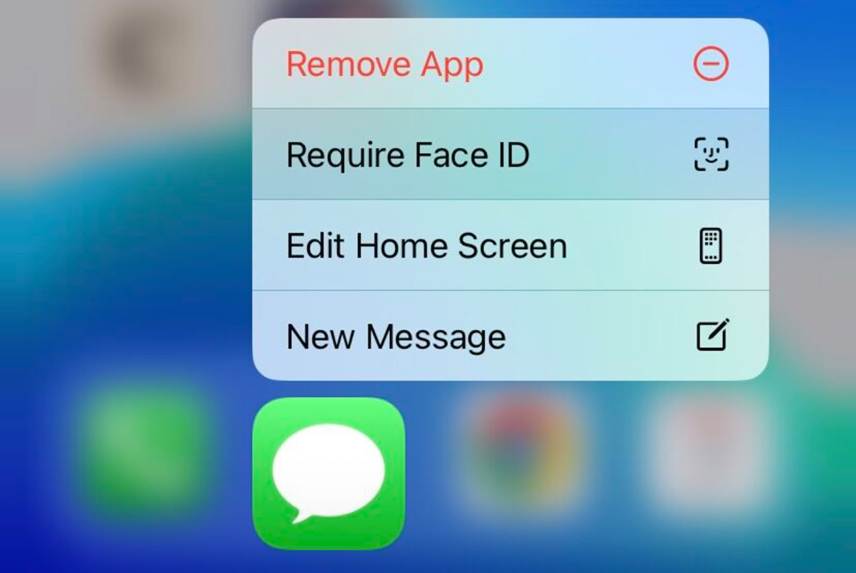
Imagine you're out at a café and leave your phone on the table to grab a coffee. It's unlocked. A stranger picks it up, opens your email app, and finds it doesn't require Face ID or a password.
They then open your bank account, social media profile, or worse — a business application, then they tap 'Forgot password'. A password reset email comes in. They click the link, change your password and log in.
They've just taken over your account without knowing your password, and possibly without needing to bypass your MFA at all.
If your email app is wide open, it becomes the skeleton key to reset almost anything you've ever signed into.
That's why you should always:
- Lock your email app with Face ID, fingerprint, or a separate passcode
- Set your phone to auto-lock quickly
- Turn off 'preview' messages on your lock screen so sensitive information isn't visible
You might think it's inconvenient to tap your face or thumb to open an app. But it's far more inconvenient to explain to your boss or your bank how someone drained your account or sent phishing emails from your address.
A Bigger Risk Facing IT Security This Year
Even with the strongest MFA setup, there's a growing method attackers use to sneak in the back door: token theft. But what does this mean?
When you log into a website and complete MFA, your device is given a session token by the website. This token basically says, 'This person passed all the security checks, let them in'. It's what keeps you logged in so you don't have to keep entering your password.
These tokens are often stored in your browser or system memory. If a hacker can steal that token — through a phishing website or a malicious app or browser extension — they don't need your password or MFA anymore. The token lets them skip all of that and go straight into your account as if they were you.
Token theft is increasingly used in sophisticated attacks, and it bypasses even the best MFA protection if your device isn't properly secured.
So, What Can You Do to Stay Ahead?
MFA is still essential, so don't disable it. But be clever about how you use it. Here's how to really secure your accounts:
- Avoid SMS-based MFA whenever possible and use authenticator apps instead
- Protect your authenticator app with Face ID
- Secure your phone with a strong passcode and a biometric unlock, and use a fast auto-lock
- Install endpoint protection — even on Macs and phones
- Be suspicious of strange login prompts from your MFA apps; they may be attackers trying to trick you
- Consider phishing-resistant MFA like hardware security keys (Passkeys are being rolled out across Apple, Google, and Microsoft services)
- Lock down your email accounts as much as you can — if someone gets into your email, they can get into everything
These measures form part of a broader security philosophy — if you're not familiar with Zero Trust security and how it applies to businesses like yours, it's worth understanding the basics.
Want to Know If Your Business Is Really Secure?
Cybersecurity isn't just about technology; it's about strategy and regular health checks. If you're unsure how secure your MFA setup really is, or whether you have as much protection as possible against token theft, we can help.
Dolphin IT Solutions offers free cybersecurity checkups designed to uncover vulnerabilities and recommend improvements, giving you peace of mind that your systems are protected. Whether you're a small business or a large team, let's talk. Reach out to us today for a free, no-obligation consultation.