

SharePoint 2016 & 2019 Support Ends in 2026: What to Do
Explore your options—from cloud migration to Subscription Edition—and get ahead of the change.
Microsoft has officially confirmed that extended support for SharePoint Server 2016 and SharePoint Server 2019 will end on July 14, 2026. While that may seem some time away, businesses relying on these platforms should begin planning their next steps now. A SharePoint end-of-support deadline is not just a technical milestone - it is an important moment in your wider digital transformation and platform strategy.
If your organisation still depends on SharePoint 2016 or 2019, staying informed and preparing early will help you avoid unnecessary risk and disruption. Whether you plan to upgrade your on-premises environment or move forward with a SharePoint Online migration... understanding your options is key.
What Does SharePoint End of Support Mean?
When Microsoft ends support for a SharePoint Server version, it stops delivering security updates, bug fixes, and technical assistance. The platform does not suddenly stop working, but it no longer receives protection or product improvements.
Running unsupported SharePoint infrastructure over time increases exposure to security vulnerabilities, compliance concerns, and operational instability. If an issue occurs after support ends, there is no Microsoft escalation path available. For many organisations, this alone is reason enough to begin planning a SharePoint upgrade or migration strategy well ahead of the deadline.
Risks of Staying on Unsupported SharePoint Versions
Continuing to operate an unsupported SharePoint Server environment can introduce several long-term challenges. Security is usually the biggest concern, as systems without patches become easier targets for cyber threats. Compliance can also become an issue in regulated industries where supported software is a requirement.
There are also practical limitations. Older SharePoint versions make it harder to integrate with modern Microsoft 365 services and collaboration tools. Over time, this can create productivity bottlenecks and increase support costs, especially when custom fixes are required.
The Benefits of Moving to SharePoint Online and Microsoft 365
For many businesses, this support deadline creates a good opportunity to modernise with SharePoint Online and Microsoft 365. Cloud-based SharePoint environments offer built-in security controls, modern governance features, and continuous platform updates delivered by Microsoft.
A SharePoint Online environment also improves collaboration by making documents and content securely accessible from anywhere. Teams can work in real time across SharePoint, OneDrive, Teams, and other Microsoft 365 services. New capabilities - including AI-powered features through Microsoft 365 Copilot — are delivered regularly without requiring major upgrade projects.
From a cost perspective, cloud infrastructure also removes much of the hardware maintenance and upgrade planning associated with on-premises deployments, while still allowing organisations to scale usage as needed.
Planning a Smooth SharePoint Migration
A successful SharePoint migration project starts with a clear understanding of your current environment. Reviewing existing sites, content, workflows, and permissions helps identify what should be migrated, archived, or redesigned.
From there, businesses can build a structured migration plan with realistic timelines and the right tooling, such as Microsoft Migration Manager or third-party migration platforms. User adoption should also be considered early. Training, governance policies, and post-migration support play an important role in ensuring the new environment is used effectively.
Not Ready for the Cloud? SharePoint Server Subscription Edition
If moving to the cloud is not currently suitable due to regulatory, security, or data residency requirements, Microsoft provides an on-premises alternative in SharePoint Server Subscription Edition (SE). This version follows a modern servicing model with continuous updates and an active support lifecycle.
Subscription Edition allows organisations to remain on-premises while still staying within Microsoft’s supported SharePoint ecosystem. A trial period is available, which makes it easier to evaluate before committing.
SharePoint Online vs Subscription Edition
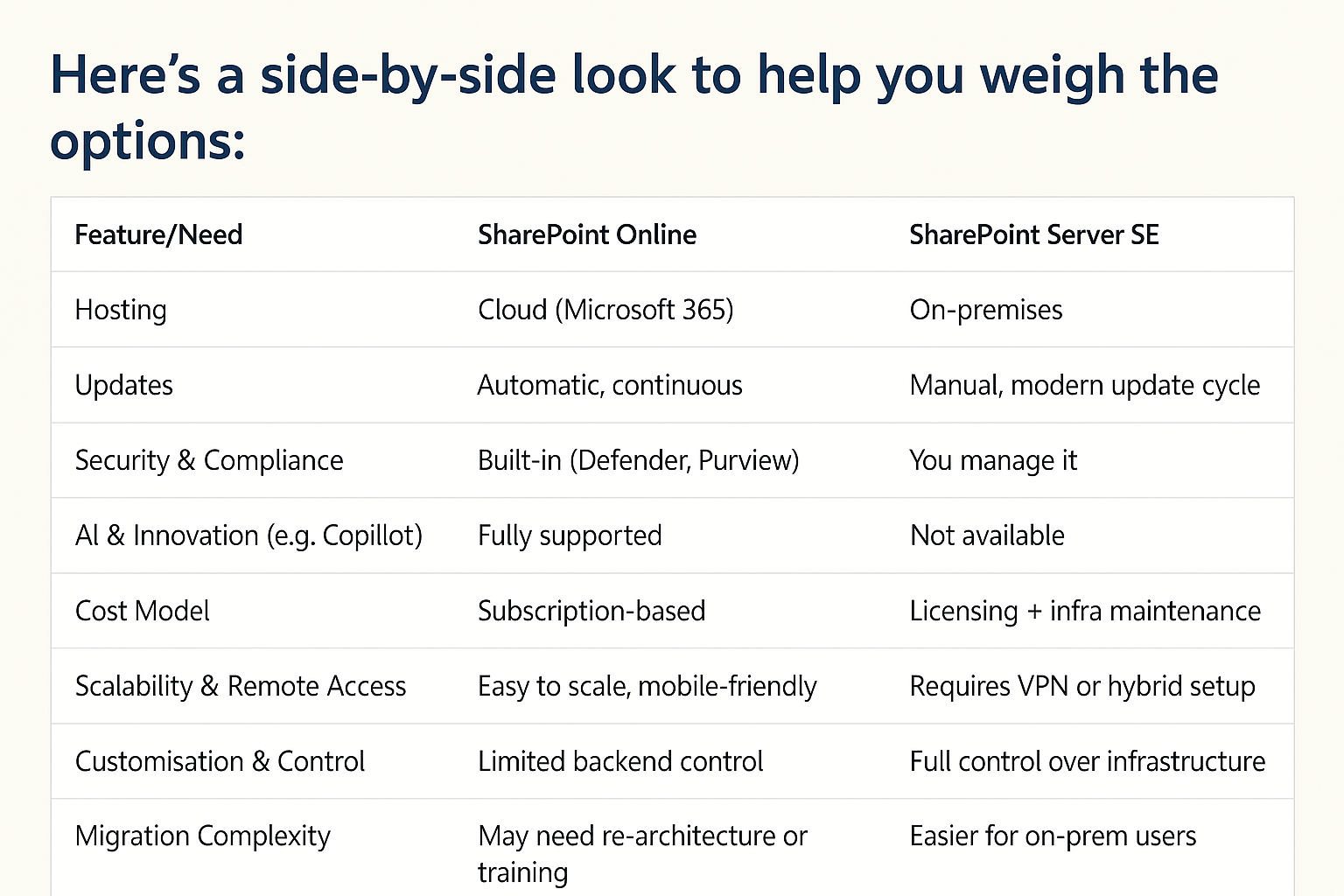
To help visualise the differences between SharePoint Online migration and SharePoint Server Subscription Edition, see the comparison overview below. This highlights how cloud and on-premises paths differ in areas such as infrastructure, updates, security model, and scalability.
Start Planning Early
Whichever direction you choose - SharePoint Online or Subscription Edition — early planning makes the process smoother and more cost-effective. SharePoint upgrades and migrations take time, coordination, and the right technical approach. Starting now reduces risk and gives your organisation flexibility.
At Dolphin IT Solutions, we support organisations with SharePoint migrations, upgrades, and Microsoft 365 transformation projects.
If you’d like guidance on your SharePoint next steps, get in touch with our experts for a consultation.